

 Authenticate
 Manage Users
 Customize
 Platform
Create a test tenant and application
- Create a new tenant to use for testing.
- Create a Machine-to-Machine application. You need the application’s client ID and secret to enable scopes in the Management API and when you create custom database action scripts.
-
Enable both the Password and Client Credential grant for this application.
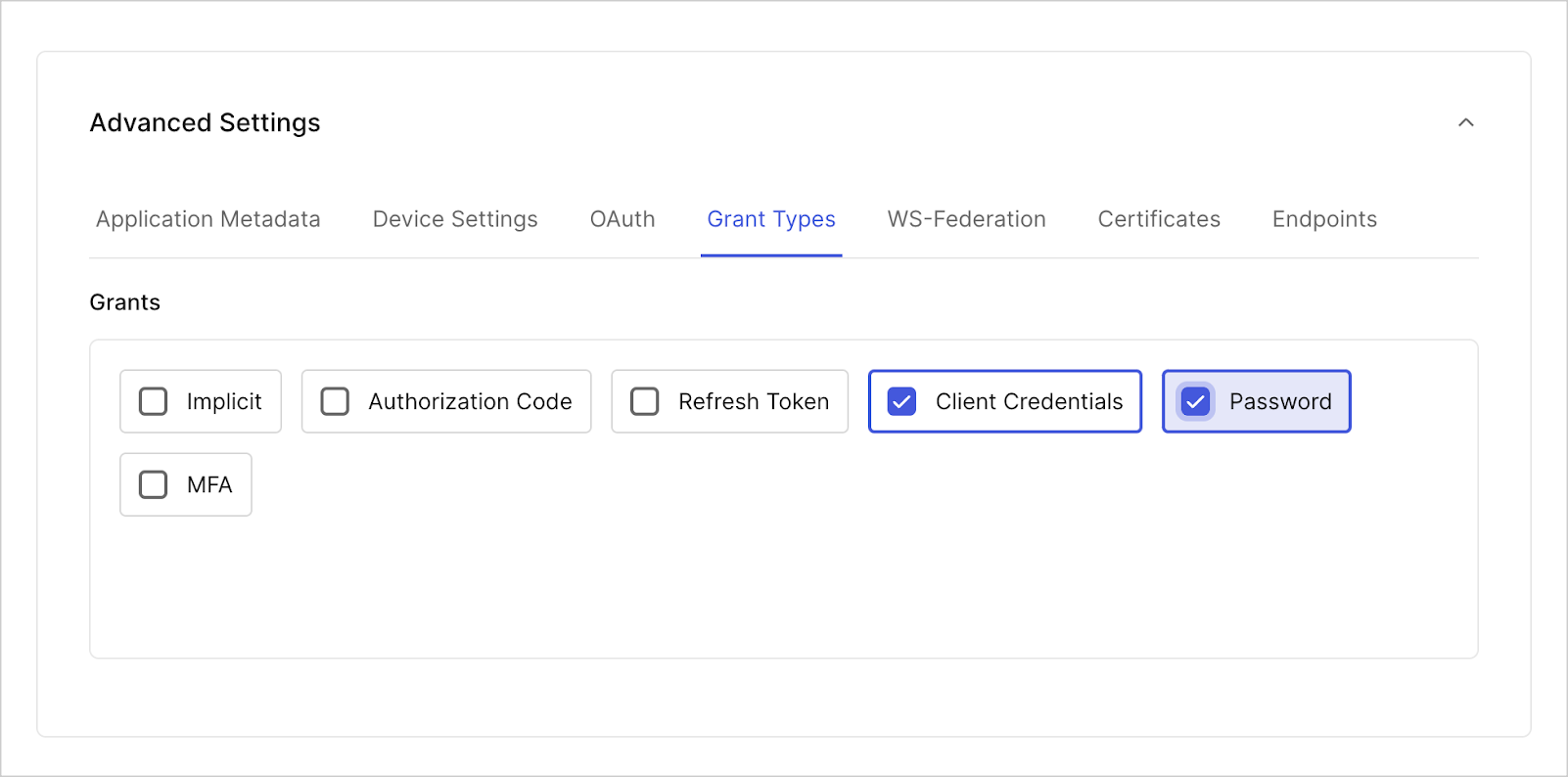
- To authorize your application, navigate to Applications > APIs and select Management API.
- Under the Machine-to-Machine Applications tab, use the toggle to authorize your test application.
-
Select the drop-down menu to enable the following Auth0 Management API scopes:
read:usersupdate:usersdelete:userscreate:usersread:users_app_metadataupdate:users_app_metadatacreate:users_app_metadata
Test with import users to Auth0 enabled
To test a custom database connection with import users enabled, after you create a tenant and an application, create a source database connection and a target database connection.-
From Dashboard > Authentication > Database, create two database connections (one to be the source and the other to be the target) with Required Username enabled. If you want to test using Organizations, enable Context object in database scripts.
You can set the Password Policy to Non-empty password required in both target and source databases so you can use simple passwords in your tests.
- Create test users in your source database connection. From Dashboard > User Management > Users, select **+Create User > Create via UI. In the Create user window that opens, for Connection, choose your source database connection. Fill in the necessary fields, then select Create (or Create Another).
-
Configure the target database connection:
- On the Custom Database tab, toggle Use my own database.
- On the Settings tab, enable Import Users to Auth0.
-
On the Custom Database tab, in the Database settings section, add the following information from the source database connection:
Key Value client_idClient ID of the application you created. client_secretClient Secret of the application you created. auth0_domainYour tenant name in the Auth0 domain: yourTenant.us.auth0.com.source_databaseName of the source connection.
- Update the Login and Get User database action scripts in your target database.
-
Select Save and Try on each script. You should monitor Actions Real-time Logs
console.logoutput. - Select Try Connection to test the connection live.
Test with import users to Auth0 disabled
To test a custom database connection with import users to Auth0 disabled, after you create a tenant and an application, create a source database connection and a target database connection.- From Dashboard > Authentication > Database, create one test database connection to be the target.
-
Update the database action scripts with the samples below.
- Get User
- Login
- Create
- Delete
- Verify
- Change Password
- Change Email
Update the Get User script with the following sample:async function getUser(user, context, callback) { log(`Script started.`); log(`Requesting an Access Token from "${configuration.auth0_domain}".`); let accessToken = await getAccessToken(); accessToken = accessToken.access_token; if (!accessToken) return log(`Failed to get an Access Token from "${configuration.auth0_domain}".`, true); log(`The Access Token is available. Searching for user "${user}" in "${configuration.source_database}"`); user = user.toLowerCase(); const searchQuery = encodeURI(`identities.connection:"${configuration.source_database}"+AND+(email:${user} OR username:${user})`); var options = { method: `GET`, url: `https://${configuration.auth0_domain}/api/v2/users?q=${searchQuery}`, headers: { Authorization: `Bearer ${accessToken}`, } }; request(options, function (error, response) { if (error) return log(`Cannot connect to "${configuration.source_database}" database.`, true); let search_results = JSON.parse(response.body); let profile = null; if (search_results.length > 0) { log(`A user "${user}" is FOUND in "${configuration.source_database}" database.`); profile = { user_id: search_results[0].user_id.toString(), nickname: search_results[0].nickname, username: search_results[0].username, email: search_results[0].email }; } else { log(`A user "${user}" is NOT FOUND in "${configuration.source_database}" database.`); } log(`Script completed!`); return callback(null, profile); }); /* -- GET ACCESS TOKEN VIA CLIENT CREDENTIALS -- */ async function getAccessToken() { var options = { method: `POST`, url: `https://${configuration.auth0_domain}/oauth/token`, headers: { "Content-Type": `application/x-www-form-urlencoded`, }, form: { grant_type: `client_credentials`, client_id: configuration.client_id, client_secret: configuration.client_secret, audience: `https://${configuration.auth0_domain}/api/v2/` }, json: true }; return new Promise(function (resolve) { request(options, function (error, response) { resolve(error || response.body); }); }); } /* -- LOGGING -- */ function log(message, error = false) { const script_name = `GET USER`; const error_label = error ? `(ERROR)` : ``; const return_message = `${script_name}: ${error_label} ${message}`; console.log(return_message); if (error) return callback(new Error(return_message)); } }Update the Login script with the following sample:function login(usernameOrEmail, password, context, callback) { log(`Script started.`); const jwt = require('jsonwebtoken'); const options = { method: `POST`, url: `https://${configuration.auth0_domain}/oauth/token`, headers: { "Content-Type": `application/x-www-form-urlencoded` }, json: true, form: { grant_type: `http://auth0.com/oauth/grant-type/password-realm`, client_id: configuration.client_id, client_secret: configuration.client_secret, username: usernameOrEmail, password: password, realm: `${configuration.source_database}` } }; request(options, function (error, response, body) { log(`Attempting to authenticate a user "${usernameOrEmail}" against "${configuration.source_database}" database in "${configuration.auth0_domain}" tenant.`); if (error) return log(`Cannot connect to "${configuration.auth0_domain}" database.`, true); if (response.statusCode !== 200) { console.log(`LOGIN: (ERROR) ${response.body.error_description}`); return callback(new WrongUsernameOrPasswordError(usernameOrEmail, `LOGIN: (ERROR) ${response.body.error_description}`)); } log(`Successfuly authenticated user "${usernameOrEmail}" against "${configuration.source_database}" database in "${configuration.auth0_domain}" tenant.`); const decoded_id_token = jwt.decode(body.id_token); const profile = { user_id: decoded_id_token.sub, nickname: decoded_id_token.nickname, username: decoded_id_token.username, email: decoded_id_token.email }; log(`Script completed.`); return callback(null, profile); }); /* -- LOGGING -- */ function log(message, error = false) { const script_name = `LOGIN`; const error_label = error ? `(ERROR)` : ``; const return_message = `${script_name}: ${error_label} ${message}`; console.log(return_message); if (error) return callback(new Error(return_message)); } }Update the Create script to the following sample:async function create(user, context, callback) { log(`Script started.`); log(`Requesting an Access Token from "${configuration.auth0_domain}".`); let accessToken = await getAccessToken(); if (!accessToken.access_token) return log(`Failed to get an Access Token from "${configuration.auth0_domain}".`, true); accessToken = accessToken.access_token; log(`The Access Token is available. Attempting to create a user "${user.email}" in "${configuration.source_database}"`); const options = { method: `POST`, url: `https://${configuration.auth0_domain}/api/v2/users`, headers: { Authorization: `Bearer ${accessToken}`, "Content-Type": `application/x-www-form-urlencoded` }, form: { connection: configuration.source_database, email: user.email, password: user.password, username: user.username }, json: true }; request(options, function (error, response) { if (error) return log(`Cannot connect to "${configuration.source_database}" database.`, true); switch (response.statusCode) { case 201: log(`The user "${user.email}" is successfuly created in "${configuration.source_database}" database.`); return callback(null); case 409: return callback(new ValidationError(`user_exists`, `The user already exists in "${configuration.source_database}" database.`)); default: return log(`Failed to create a user "${user.email}" in "${configuration.source_database}" database. Error: "${response.statusCode}, ${response.body.message}"`, true); } }); /* -- GET ACCESS TOKEN VIA CLIENT CREDENTIALS -- */ async function getAccessToken() { var options = { method: `POST`, url: `https://${configuration.auth0_domain}/oauth/token`, headers: { "Content-Type": `application/x-www-form-urlencoded`, }, form: { grant_type: `client_credentials`, client_id: configuration.client_id, client_secret: configuration.client_secret, audience: `https://${configuration.auth0_domain}/api/v2/` }, json: true }; return new Promise(function (resolve) { request(options, function (error, response) { resolve(error || response.body); }); }); } /* -- LOGGING -- */ function log(message, error = false) { const script_name = `CREATE`; const error_label = error ? `(ERROR)` : ``; const return_message = `${script_name}: ${error_label} ${message}`; console.log(return_message); if (error) return callback(new Error(return_message)); } }Update the Delete script to the following sample:async function deleteUser(user, context, callback) { log(`Script started.`); log(`Requesting an Access Token from "${configuration.auth0_domain}".`); let accessToken = await getAccessToken(); if (!accessToken.access_token) return log(`Failed to get an Access Token from "${configuration.auth0_domain}".`, true); accessToken = accessToken.access_token; log(`The Access Token is available. Attempting to delete a user "${user}" from "${configuration.source_database}"`); const options = { method: `DELETE`, url: `https://${configuration.auth0_domain}/api/v2/users/${user}`, headers: { Authorization: `Bearer ${accessToken}`, "Content-Type": `application/x-www-form-urlencoded` }, json: true }; request(options, function (error, response) { if (error) return log(`Cannot connect to "${configuration.source_database}" database.`, true); switch (response.statusCode) { case 204: log(`The user "${user}" is successfuly deleted from "${configuration.source_database}" database.`); return callback(null); default: return log(`Failed to delete a user "${user}" from "${configuration.source_database}" database. Error: "${response.statusCode}, ${response.body.message}"`, true); } }); /* -- GET ACCESS TOKEN VIA CLIENT CREDENTIALS -- */ async function getAccessToken() { var options = { method: `POST`, url: `https://${configuration.auth0_domain}/oauth/token`, headers: { "Content-Type": `application/x-www-form-urlencoded`, }, form: { grant_type: `client_credentials`, client_id: configuration.client_id, client_secret: configuration.client_secret, audience: `https://${configuration.auth0_domain}/api/v2/` }, json: true }; return new Promise(function (resolve) { request(options, function (error, response) { resolve(error || response.body); }); }); } /* -- LOGGING -- */ function log(message, error = false) { const script_name = `DELETE`; const error_label = error ? `(ERROR)` : ``; const return_message = `${script_name}: ${error_label} ${message}`; console.log(return_message); if (error) return callback(new Error(return_message)); } }Update the Verify script to the following sample:async function verify(user, context, callback) { log(`Script started.`); log(`Requesting an Access Token from "${configuration.auth0_domain}".`); let accessToken = await getAccessToken(); if (!accessToken.access_token) return log(`Failed to get an Access Token from "${configuration.auth0_domain}".`, true); accessToken = accessToken.access_token; log(`The Access Token is available. Searching for user "${user}" in "${configuration.source_database}"`); user = user.toLowerCase(); const searchQuery = encodeURI(`identities.connection:"${configuration.source_database}"+AND+(email:${user} OR username:${user})`); var options = { method: `GET`, url: `https://${configuration.auth0_domain}/api/v2/users?q=${searchQuery}`, headers: { Authorization: `Bearer ${accessToken}`, } }; request(options, function (error, response) { if (error) return log(`Cannot connect to "${configuration.source_database}" database.`, true); let search_results = JSON.parse(response.body); if (search_results.length > 0) { log(`A user "${user}" is found in "${configuration.source_database}" database.`); const user_id = search_results[0].user_id.toString(); log(`Attempting to mark user "${user_id}" as verified in "${configuration.source_database}" database`); const options = { method: `PATCH`, url: `https://${configuration.auth0_domain}/api/v2/users/${user_id}`, headers: { Authorization: `Bearer ${accessToken}`, "Content-Type": `application/x-www-form-urlencoded` }, form: { email_verified: true, }, json: true }; request(options, function (error, response) { if (error) return log(`Cannot connect to "${configuration.source_database}" database.`, true); switch (response.statusCode) { case 200: log(`The user "${user}" is marked as verified in "${configuration.source_database}" database.`); return callback(null, true); default: return log(`Failed to mark a user "${user}" as verified in "${configuration.source_database}" database. Error: "${response.statusCode}, ${response.body.message}"`, true); } }); } else { log(`A user "${user}" is not found in "${configuration.source_database}" database. Unable to verify.`, true); } }); /* -- GET ACCESS TOKEN VIA CLIENT CREDENTIALS -- */ async function getAccessToken() { var options = { method: `POST`, url: `https://${configuration.auth0_domain}/oauth/token`, headers: { "Content-Type": `application/x-www-form-urlencoded`, }, form: { grant_type: `client_credentials`, client_id: configuration.client_id, client_secret: configuration.client_secret, audience: `https://${configuration.auth0_domain}/api/v2/` }, json: true }; return new Promise(function (resolve) { request(options, function (error, response) { resolve(error || response.body); }); }); } /* -- LOGGING -- */ function log(message, error = false) { const script_name = `VERIFY`; const error_label = error ? `(ERROR)` : ``; const return_message = `${script_name}: ${error_label} ${message}`; console.log(return_message); if (error) return callback(new Error(return_message)); } }Update the Change Password script to the following sample:async function changePassword(user, newPassword, context, callback) { log(`Script started.`); log(`Requesting an Access Token from "${configuration.auth0_domain}".`); let accessToken = await getAccessToken(); if (!accessToken.access_token) return log(`Failed to get an Access Token from "${configuration.auth0_domain}".`, true); accessToken = accessToken.access_token; log(`The Access Token is available. Searching for user "${user}" in "${configuration.source_database}" database.`); user = user.toLowerCase(); const searchQuery = encodeURI(`identities.connection:"${configuration.source_database}"+AND+(email:${user} OR username:${user})`); var options = { method: `GET`, url: `https://${configuration.auth0_domain}/api/v2/users?q=${searchQuery}`, headers: { Authorization: `Bearer ${accessToken}`, } }; request(options, function (error, response) { if (error) return log(`Cannot connect to "${configuration.source_database}" database.`, true); let search_results = JSON.parse(response.body); if (search_results.length > 0) { log(`A user "${user}" is found in "${configuration.source_database}" database.`); const user_id = search_results[0].user_id.toString(); log(`Attempting to change password for user "${user_id}" in "${configuration.source_database}" database.`); const options = { method: `PATCH`, url: `https://${configuration.auth0_domain}/api/v2/users/${user_id}`, headers: { Authorization: `Bearer ${accessToken}`, "Content-Type": `application/x-www-form-urlencoded` }, form: { password: newPassword, }, json: true }; request(options, function (error, response) { if (error) return log(`Cannot connect to "${configuration.source_database}" database.`, true); switch (response.statusCode) { case 200: log(`The user "${user}" password successfully changed in "${configuration.source_database}" database.`); return callback(null, true); default: return log(`Failed to change password for "${user}" in "${configuration.source_database}" database. Error: "${response.statusCode}, ${response.body.message}"`, true); } }); } else { log(`A user "${user}" is not found in "${configuration.source_database}" database. Unable to change password.`, true); } }); /* -- GET ACCESS TOKEN VIA CLIENT CREDENTIALS -- */ async function getAccessToken() { var options = { method: `POST`, url: `https://${configuration.auth0_domain}/oauth/token`, headers: { "Content-Type": `application/x-www-form-urlencoded`, }, form: { grant_type: `client_credentials`, client_id: configuration.client_id, client_secret: configuration.client_secret, audience: `https://${configuration.auth0_domain}/api/v2/` }, json: true }; return new Promise(function (resolve) { request(options, function (error, response) { resolve(error || response.body); }); }); } /* -- LOGGING -- */ function log(message, error = false) { const script_name = `CHANGE PASSWORD`; const error_label = error ? `(ERROR)` : ``; const return_message = `${script_name}: ${error_label} ${message}`; console.log(return_message); if (error) return callback(new Error(return_message)); } }Update the Change Email script with the following sample:async function changeEmail(user, newEmail, verified, callback) { log(`Script started.`); log(`Requesting an Access Token from "${configuration.auth0_domain}".`); let accessToken = await getAccessToken(); if (!accessToken.access_token) return log(`Failed to get an Access Token from "${configuration.auth0_domain}".`, true); accessToken = accessToken.access_token; log(`The Access Token is available. Searching for user "${user}" in "${configuration.source_database}" database.`); user = user.toLowerCase(); const searchQuery = encodeURI(`identities.connection:"${configuration.source_database}"+AND+(email:${user} OR username:${user})`); var options = { method: `GET`, url: `https://${configuration.auth0_domain}/api/v2/users?q=${searchQuery}`, headers: { Authorization: `Bearer ${accessToken}`, } }; request(options, function (error, response) { if (error) return log(`Cannot connect to "${configuration.source_database}" database.`, true); let search_results = JSON.parse(response.body); if (search_results.length > 0) { log(`A user "${user}" is found in "${configuration.source_database}" database.`); const user_id = search_results[0].user_id.toString(); log(`Attempting to change email / verified status for user "${user_id}" in "${configuration.source_database}" database.`); const options = { method: `PATCH`, url: `https://${configuration.auth0_domain}/api/v2/users/${user_id}`, headers: { Authorization: `Bearer ${accessToken}`, "Content-Type": `application/x-www-form-urlencoded` }, form: { email: newEmail, email_verified: verified || false }, json: true }; request(options, function (error, response) { if (error) return log(`Cannot connect to "${configuration.source_database}" database.`, true); switch (response.statusCode) { case 200: log(`The user "${user}" email / verified status successfully changed in "${configuration.source_database}" database.`); return callback(null, true); default: return log(`Failed to change email / verified status for "${user}" in "${configuration.source_database}" database. Error: "${response.statusCode}, ${response.body.message}"`, true); } }); } else { log(`A user "${user}" is not found in "${configuration.source_database}" database. Unable to change email / verified status.`, true); } }); /* -- GET ACCESS TOKEN VIA CLIENT CREDENTIALS -- */ async function getAccessToken() { var options = { method: `POST`, url: `https://${configuration.auth0_domain}/oauth/token`, headers: { "Content-Type": `application/x-www-form-urlencoded`, }, form: { grant_type: `client_credentials`, client_id: configuration.client_id, client_secret: configuration.client_secret, audience: `https://${configuration.auth0_domain}/api/v2/` }, json: true }; return new Promise(function (resolve) { request(options, function (error, response) { resolve(error || response.body); }); }); } /* -- LOGGING -- */ function log(message, error = false) { const script_name = `CHANGE EMAIL`; const error_label = error ? `(ERROR)` : ``; const return_message = `${script_name}: ${error_label} ${message}`; console.log(return_message); if (error) return callback(new Error(return_message)); } } -
Select Save and Try on each script. You should monitor Actions Real-time Logs
console.logoutput. - Select Try Connection to test the connection live.