> ## Documentation Index
> Fetch the complete documentation index at: https://auth0-docs-ia-custom-database-connections.mintlify.site/llms.txt
> Use this file to discover all available pages before exploring further.
# How to Test Custom Database Connections
> Describes how to test your custom database connections.
You can use the Auth0 Dashboard test a custom database connection by authenticating users against the same or a separate tenant.
Whether you have [enabled importing users](/docs/manage-users/user-migration/configure-automatic-migration-from-your-database) from your user store or not, start by creating a test tenant and application.
## Create a test tenant and application
1. [Create a new tenant](/docs/get-started/auth0-overview/create-tenants) to use for testing.
2. [Create a Machine-to-Machine application](https://manage.auth0.com/#/applications/applications/create).
You need the application's client ID and secret to enable scopes in the Management API and when you create custom database action scripts.
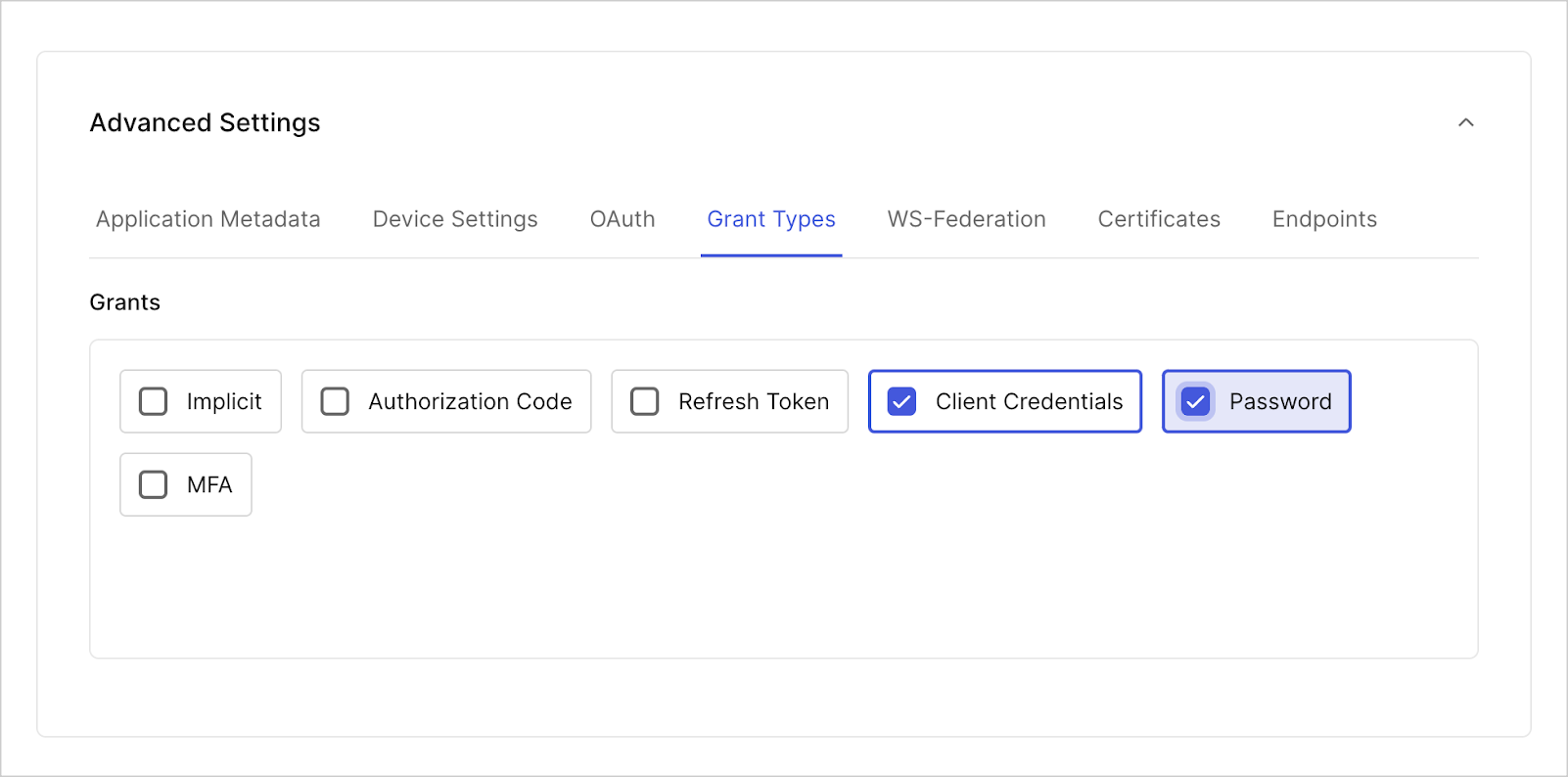
3. Enable both the **Password** and **Client Credential** grant for this application.
 4. To authorize your application, navigate to [Applications > APIs](https://manage.auth0.com/#/apis) and select **Management API**.
5. Under the **Machine-to-Machine Applications** tab, use the toggle to authorize your test application.
6. Select the drop-down menu to enable the following Auth0 Management API scopes:
* `read:users`
* `update:users`
* `delete:users`
* `create:users`
* `read:users_app_metadata`
* `update:users_app_metadata`
* `create:users_app_metadata`
## Test with import users to Auth0 enabled
To test a custom database connection with [import users enabled](/docs/manage-users/user-migration/configure-automatic-migration-from-your-database), after you create a tenant and an application, create a source database connection and a target database connection.
1. From [**Dashboard > Authentication > Database**](https://manage.auth0.com/#/connections/database), create two database connections (one to be the source and the other to be the target) with **Required Username** enabled. If you want to test using Organizations, enable **Context object in database scripts**.
You can set the **Password Policy** to **Non-empty password required** in both target and source databases so you can use simple passwords in your tests.
2. Create test users in your source database connection. From [**Dashboard > User Management > Users**](https://manage.auth0.com/#/users), select \*\*+Create User > **Create via UI**.
In the **Create user** window that opens, for **Connection**, choose your source database connection. Fill in the necessary fields, then select **Create** (or **Create Another**).
3. Configure the target database connection:
* On the **Custom Database** tab, toggle **Use my own database**.
* On the **Settings** tab, enable **Import Users to Auth0**.
* On the **Custom Database** tab, in the **Database settings** section, add the following information from the source database connection:
| Key | Value |
| ----------------- | ---------------------------------------------------------------- |
| `client_id` | Client ID of the application you created. |
| `client_secret` | Client Secret of the application you created. |
| `auth0_domain` | Your tenant name in the Auth0 domain: `yourTenant.us.auth0.com`. |
| `source_database` | Name of the source connection. |
4. Update the [Login](/docs/authenticate/database-connections/custom-db/templates/login) and [Get User](/docs/authenticate/database-connections/custom-db/templates/get-user) database action scripts in your target database.
5. Select **Save and Try** on each script. You should monitor [Actions Real-time Logs](/docs/customize/actions/actions-real-time-logs) `console.log` output.
6. Select **Try Connection** to test the connection live.
## Test with import users to Auth0 disabled
To test a custom database connection with import users to Auth0 disabled, after you create a tenant and an application, create a source database connection and a target database connection.
1. From [**Dashboard > Authentication > Database**](https://manage.auth0.com/#/connections/database), create one test database connection to be the target.
2. Update the database action scripts with the samples below.
Update the [Get User script](/docs/authenticate/database-connections/custom-db/templates/get-user) with the following sample:
```js lines expandable theme={null}
async function getUser(user, context, callback) {
log(`Script started.`);
log(`Requesting an Access Token from "${configuration.auth0_domain}".`);
let accessToken = await getAccessToken();
accessToken = accessToken.access_token;
if (!accessToken) return log(`Failed to get an Access Token from "${configuration.auth0_domain}".`, true);
log(`The Access Token is available. Searching for user "${user}" in "${configuration.source_database}"`);
user = user.toLowerCase();
const searchQuery = encodeURI(`identities.connection:"${configuration.source_database}"+AND+(email:${user} OR username:${user})`);
var options = {
method: `GET`,
url: `https://${configuration.auth0_domain}/api/v2/users?q=${searchQuery}`,
headers: {
Authorization: `Bearer ${accessToken}`,
}
};
request(options, function (error, response) {
if (error) return log(`Cannot connect to "${configuration.source_database}" database.`, true);
let search_results = JSON.parse(response.body);
let profile = null;
if (search_results.length > 0) {
log(`A user "${user}" is FOUND in "${configuration.source_database}" database.`);
profile = {
user_id: search_results[0].user_id.toString(),
nickname: search_results[0].nickname,
username: search_results[0].username,
email: search_results[0].email
};
} else {
log(`A user "${user}" is NOT FOUND in "${configuration.source_database}" database.`);
}
log(`Script completed!`);
return callback(null, profile);
});
/* -- GET ACCESS TOKEN VIA CLIENT CREDENTIALS -- */
async function getAccessToken() {
var options = {
method: `POST`,
url: `https://${configuration.auth0_domain}/oauth/token`,
headers: {
"Content-Type": `application/x-www-form-urlencoded`,
},
form: {
grant_type: `client_credentials`,
client_id: configuration.client_id,
client_secret: configuration.client_secret,
audience: `https://${configuration.auth0_domain}/api/v2/`
},
json: true
};
return new Promise(function (resolve) {
request(options, function (error, response) {
resolve(error || response.body);
});
});
}
/* -- LOGGING -- */
function log(message, error = false) {
const script_name = `GET USER`;
const error_label = error ? `(ERROR)` : ``;
const return_message = `${script_name}: ${error_label} ${message}`;
console.log(return_message);
if (error) return callback(new Error(return_message));
}
}
```
Update the [Login script](/docs/authenticate/database-connections/custom-db/templates/login) with the following sample:
```javascript lines expandable theme={null}
function login(usernameOrEmail, password, context, callback) {
log(`Script started.`);
const jwt = require('jsonwebtoken');
const options = {
method: `POST`,
url: `https://${configuration.auth0_domain}/oauth/token`,
headers: { "Content-Type": `application/x-www-form-urlencoded` },
json: true,
form: {
grant_type: `http://auth0.com/oauth/grant-type/password-realm`,
client_id: configuration.client_id,
client_secret: configuration.client_secret,
username: usernameOrEmail,
password: password,
realm: `${configuration.source_database}`
}
};
request(options, function (error, response, body) {
log(`Attempting to authenticate a user "${usernameOrEmail}" against "${configuration.source_database}" database in "${configuration.auth0_domain}" tenant.`);
if (error) return log(`Cannot connect to "${configuration.auth0_domain}" database.`, true);
if (response.statusCode !== 200) {
console.log(`LOGIN: (ERROR) ${response.body.error_description}`);
return callback(new WrongUsernameOrPasswordError(usernameOrEmail, `LOGIN: (ERROR) ${response.body.error_description}`));
}
log(`Successfuly authenticated user "${usernameOrEmail}" against "${configuration.source_database}" database in "${configuration.auth0_domain}" tenant.`);
const decoded_id_token = jwt.decode(body.id_token);
const profile = {
user_id: decoded_id_token.sub,
nickname: decoded_id_token.nickname,
username: decoded_id_token.username,
email: decoded_id_token.email
};
log(`Script completed.`);
return callback(null, profile);
});
/* -- LOGGING -- */
function log(message, error = false) {
const script_name = `LOGIN`;
const error_label = error ? `(ERROR)` : ``;
const return_message = `${script_name}: ${error_label} ${message}`;
console.log(return_message);
if (error) return callback(new Error(return_message));
}
}
```
Update the [Create script](/docs/authenticate/database-connections/custom-db/templates/create) to the following sample:
```js lines expandable theme={null}
async function create(user, context, callback) {
log(`Script started.`);
log(`Requesting an Access Token from "${configuration.auth0_domain}".`);
let accessToken = await getAccessToken();
if (!accessToken.access_token) return log(`Failed to get an Access Token from "${configuration.auth0_domain}".`, true);
accessToken = accessToken.access_token;
log(`The Access Token is available. Attempting to create a user "${user.email}" in "${configuration.source_database}"`);
const options = {
method: `POST`,
url: `https://${configuration.auth0_domain}/api/v2/users`,
headers: {
Authorization: `Bearer ${accessToken}`,
"Content-Type": `application/x-www-form-urlencoded`
},
form: {
connection: configuration.source_database,
email: user.email,
password: user.password,
username: user.username
},
json: true
};
request(options, function (error, response) {
if (error) return log(`Cannot connect to "${configuration.source_database}" database.`, true);
switch (response.statusCode) {
case 201:
log(`The user "${user.email}" is successfuly created in "${configuration.source_database}" database.`);
return callback(null);
case 409:
return callback(new ValidationError(`user_exists`, `The user already exists in "${configuration.source_database}" database.`));
default:
return log(`Failed to create a user "${user.email}" in "${configuration.source_database}" database. Error: "${response.statusCode}, ${response.body.message}"`, true);
}
});
/* -- GET ACCESS TOKEN VIA CLIENT CREDENTIALS -- */
async function getAccessToken() {
var options = {
method: `POST`,
url: `https://${configuration.auth0_domain}/oauth/token`,
headers: {
"Content-Type": `application/x-www-form-urlencoded`,
},
form: {
grant_type: `client_credentials`,
client_id: configuration.client_id,
client_secret: configuration.client_secret,
audience: `https://${configuration.auth0_domain}/api/v2/`
},
json: true
};
return new Promise(function (resolve) {
request(options, function (error, response) {
resolve(error || response.body);
});
});
}
/* -- LOGGING -- */
function log(message, error = false) {
const script_name = `CREATE`;
const error_label = error ? `(ERROR)` : ``;
const return_message = `${script_name}: ${error_label} ${message}`;
console.log(return_message);
if (error) return callback(new Error(return_message));
}
}
```
Update the [Delete script](/docs/authenticate/database-connections/custom-db/templates/delete) to the following sample:
```js lines expandable theme={null}
async function deleteUser(user, context, callback) {
log(`Script started.`);
log(`Requesting an Access Token from "${configuration.auth0_domain}".`);
let accessToken = await getAccessToken();
if (!accessToken.access_token) return log(`Failed to get an Access Token from "${configuration.auth0_domain}".`, true);
accessToken = accessToken.access_token;
log(`The Access Token is available. Attempting to delete a user "${user}" from "${configuration.source_database}"`);
const options = {
method: `DELETE`,
url: `https://${configuration.auth0_domain}/api/v2/users/${user}`,
headers: {
Authorization: `Bearer ${accessToken}`,
"Content-Type": `application/x-www-form-urlencoded`
},
json: true
};
request(options, function (error, response) {
if (error) return log(`Cannot connect to "${configuration.source_database}" database.`, true);
switch (response.statusCode) {
case 204:
log(`The user "${user}" is successfuly deleted from "${configuration.source_database}" database.`);
return callback(null);
default:
return log(`Failed to delete a user "${user}" from "${configuration.source_database}" database. Error: "${response.statusCode}, ${response.body.message}"`, true);
}
});
/* -- GET ACCESS TOKEN VIA CLIENT CREDENTIALS -- */
async function getAccessToken() {
var options = {
method: `POST`,
url: `https://${configuration.auth0_domain}/oauth/token`,
headers: {
"Content-Type": `application/x-www-form-urlencoded`,
},
form: {
grant_type: `client_credentials`,
client_id: configuration.client_id,
client_secret: configuration.client_secret,
audience: `https://${configuration.auth0_domain}/api/v2/`
},
json: true
};
return new Promise(function (resolve) {
request(options, function (error, response) {
resolve(error || response.body);
});
});
}
/* -- LOGGING -- */
function log(message, error = false) {
const script_name = `DELETE`;
const error_label = error ? `(ERROR)` : ``;
const return_message = `${script_name}: ${error_label} ${message}`;
console.log(return_message);
if (error) return callback(new Error(return_message));
}
}
```
Update the [Verify script](/docs/authenticate/database-connections/custom-db/templates/verify) to the following sample:
```js lines expandable theme={null}
async function verify(user, context, callback) {
log(`Script started.`);
log(`Requesting an Access Token from "${configuration.auth0_domain}".`);
let accessToken = await getAccessToken();
if (!accessToken.access_token) return log(`Failed to get an Access Token from "${configuration.auth0_domain}".`, true);
accessToken = accessToken.access_token;
log(`The Access Token is available. Searching for user "${user}" in "${configuration.source_database}"`);
user = user.toLowerCase();
const searchQuery = encodeURI(`identities.connection:"${configuration.source_database}"+AND+(email:${user} OR username:${user})`);
var options = {
method: `GET`,
url: `https://${configuration.auth0_domain}/api/v2/users?q=${searchQuery}`,
headers: {
Authorization: `Bearer ${accessToken}`,
}
};
request(options, function (error, response) {
if (error) return log(`Cannot connect to "${configuration.source_database}" database.`, true);
let search_results = JSON.parse(response.body);
if (search_results.length > 0) {
log(`A user "${user}" is found in "${configuration.source_database}" database.`);
const user_id = search_results[0].user_id.toString();
log(`Attempting to mark user "${user_id}" as verified in "${configuration.source_database}" database`);
const options = {
method: `PATCH`,
url: `https://${configuration.auth0_domain}/api/v2/users/${user_id}`,
headers: {
Authorization: `Bearer ${accessToken}`,
"Content-Type": `application/x-www-form-urlencoded`
},
form: {
email_verified: true,
},
json: true
};
request(options, function (error, response) {
if (error) return log(`Cannot connect to "${configuration.source_database}" database.`, true);
switch (response.statusCode) {
case 200:
log(`The user "${user}" is marked as verified in "${configuration.source_database}" database.`);
return callback(null, true);
default:
return log(`Failed to mark a user "${user}" as verified in "${configuration.source_database}" database. Error: "${response.statusCode}, ${response.body.message}"`, true);
}
});
} else {
log(`A user "${user}" is not found in "${configuration.source_database}" database. Unable to verify.`, true);
}
});
/* -- GET ACCESS TOKEN VIA CLIENT CREDENTIALS -- */
async function getAccessToken() {
var options = {
method: `POST`,
url: `https://${configuration.auth0_domain}/oauth/token`,
headers: {
"Content-Type": `application/x-www-form-urlencoded`,
},
form: {
grant_type: `client_credentials`,
client_id: configuration.client_id,
client_secret: configuration.client_secret,
audience: `https://${configuration.auth0_domain}/api/v2/`
},
json: true
};
return new Promise(function (resolve) {
request(options, function (error, response) {
resolve(error || response.body);
});
});
}
/* -- LOGGING -- */
function log(message, error = false) {
const script_name = `VERIFY`;
const error_label = error ? `(ERROR)` : ``;
const return_message = `${script_name}: ${error_label} ${message}`;
console.log(return_message);
if (error) return callback(new Error(return_message));
}
}
```
Update the [Change Password script](/docs/authenticate/database-connections/custom-db/templates/change-password) to the following sample:
```js lines expandable theme={null}
async function changePassword(user, newPassword, context, callback) {
log(`Script started.`);
log(`Requesting an Access Token from "${configuration.auth0_domain}".`);
let accessToken = await getAccessToken();
if (!accessToken.access_token) return log(`Failed to get an Access Token from "${configuration.auth0_domain}".`, true);
accessToken = accessToken.access_token;
log(`The Access Token is available. Searching for user "${user}" in "${configuration.source_database}" database.`);
user = user.toLowerCase();
const searchQuery = encodeURI(`identities.connection:"${configuration.source_database}"+AND+(email:${user} OR username:${user})`);
var options = {
method: `GET`,
url: `https://${configuration.auth0_domain}/api/v2/users?q=${searchQuery}`,
headers: {
Authorization: `Bearer ${accessToken}`,
}
};
request(options, function (error, response) {
if (error) return log(`Cannot connect to "${configuration.source_database}" database.`, true);
let search_results = JSON.parse(response.body);
if (search_results.length > 0) {
log(`A user "${user}" is found in "${configuration.source_database}" database.`);
const user_id = search_results[0].user_id.toString();
log(`Attempting to change password for user "${user_id}" in "${configuration.source_database}" database.`);
const options = {
method: `PATCH`,
url: `https://${configuration.auth0_domain}/api/v2/users/${user_id}`,
headers: {
Authorization: `Bearer ${accessToken}`,
"Content-Type": `application/x-www-form-urlencoded`
},
form: {
password: newPassword,
},
json: true
};
request(options, function (error, response) {
if (error) return log(`Cannot connect to "${configuration.source_database}" database.`, true);
switch (response.statusCode) {
case 200:
log(`The user "${user}" password successfully changed in "${configuration.source_database}" database.`);
return callback(null, true);
default:
return log(`Failed to change password for "${user}" in "${configuration.source_database}" database. Error: "${response.statusCode}, ${response.body.message}"`, true);
}
});
} else {
log(`A user "${user}" is not found in "${configuration.source_database}" database. Unable to change password.`, true);
}
});
/* -- GET ACCESS TOKEN VIA CLIENT CREDENTIALS -- */
async function getAccessToken() {
var options = {
method: `POST`,
url: `https://${configuration.auth0_domain}/oauth/token`,
headers: {
"Content-Type": `application/x-www-form-urlencoded`,
},
form: {
grant_type: `client_credentials`,
client_id: configuration.client_id,
client_secret: configuration.client_secret,
audience: `https://${configuration.auth0_domain}/api/v2/`
},
json: true
};
return new Promise(function (resolve) {
request(options, function (error, response) {
resolve(error || response.body);
});
});
}
/* -- LOGGING -- */
function log(message, error = false) {
const script_name = `CHANGE PASSWORD`;
const error_label = error ? `(ERROR)` : ``;
const return_message = `${script_name}: ${error_label} ${message}`;
console.log(return_message);
if (error) return callback(new Error(return_message));
}
}
```
Update the [Change Email script](/docs/authenticate/database-connections/custom-db/templates/change-email) with the following sample:
```js lines expandable theme={null}
async function changeEmail(user, newEmail, verified, callback) {
log(`Script started.`);
log(`Requesting an Access Token from "${configuration.auth0_domain}".`);
let accessToken = await getAccessToken();
if (!accessToken.access_token) return log(`Failed to get an Access Token from "${configuration.auth0_domain}".`, true);
accessToken = accessToken.access_token;
log(`The Access Token is available. Searching for user "${user}" in "${configuration.source_database}" database.`);
user = user.toLowerCase();
const searchQuery = encodeURI(`identities.connection:"${configuration.source_database}"+AND+(email:${user} OR username:${user})`);
var options = {
method: `GET`,
url: `https://${configuration.auth0_domain}/api/v2/users?q=${searchQuery}`,
headers: {
Authorization: `Bearer ${accessToken}`,
}
};
request(options, function (error, response) {
if (error) return log(`Cannot connect to "${configuration.source_database}" database.`, true);
let search_results = JSON.parse(response.body);
if (search_results.length > 0) {
log(`A user "${user}" is found in "${configuration.source_database}" database.`);
const user_id = search_results[0].user_id.toString();
log(`Attempting to change email / verified status for user "${user_id}" in "${configuration.source_database}" database.`);
const options = {
method: `PATCH`,
url: `https://${configuration.auth0_domain}/api/v2/users/${user_id}`,
headers: {
Authorization: `Bearer ${accessToken}`,
"Content-Type": `application/x-www-form-urlencoded`
},
form: {
email: newEmail,
email_verified: verified || false
},
json: true
};
request(options, function (error, response) {
if (error) return log(`Cannot connect to "${configuration.source_database}" database.`, true);
switch (response.statusCode) {
case 200:
log(`The user "${user}" email / verified status successfully changed in "${configuration.source_database}" database.`);
return callback(null, true);
default:
return log(`Failed to change email / verified status for "${user}" in "${configuration.source_database}" database. Error: "${response.statusCode}, ${response.body.message}"`, true);
}
});
} else {
log(`A user "${user}" is not found in "${configuration.source_database}" database. Unable to change email / verified status.`, true);
}
});
/* -- GET ACCESS TOKEN VIA CLIENT CREDENTIALS -- */
async function getAccessToken() {
var options = {
method: `POST`,
url: `https://${configuration.auth0_domain}/oauth/token`,
headers: {
"Content-Type": `application/x-www-form-urlencoded`,
},
form: {
grant_type: `client_credentials`,
client_id: configuration.client_id,
client_secret: configuration.client_secret,
audience: `https://${configuration.auth0_domain}/api/v2/`
},
json: true
};
return new Promise(function (resolve) {
request(options, function (error, response) {
resolve(error || response.body);
});
});
}
/* -- LOGGING -- */
function log(message, error = false) {
const script_name = `CHANGE EMAIL`;
const error_label = error ? `(ERROR)` : ``;
const return_message = `${script_name}: ${error_label} ${message}`;
console.log(return_message);
if (error) return callback(new Error(return_message));
}
}
```
3. Select **Save and Try** on each script. You should monitor [Actions Real-time Logs](/docs/customize/actions/actions-real-time-logs) `console.log` output.
4. Select **Try Connection** to test the connection live.
4. To authorize your application, navigate to [Applications > APIs](https://manage.auth0.com/#/apis) and select **Management API**.
5. Under the **Machine-to-Machine Applications** tab, use the toggle to authorize your test application.
6. Select the drop-down menu to enable the following Auth0 Management API scopes:
* `read:users`
* `update:users`
* `delete:users`
* `create:users`
* `read:users_app_metadata`
* `update:users_app_metadata`
* `create:users_app_metadata`
## Test with import users to Auth0 enabled
To test a custom database connection with [import users enabled](/docs/manage-users/user-migration/configure-automatic-migration-from-your-database), after you create a tenant and an application, create a source database connection and a target database connection.
1. From [**Dashboard > Authentication > Database**](https://manage.auth0.com/#/connections/database), create two database connections (one to be the source and the other to be the target) with **Required Username** enabled. If you want to test using Organizations, enable **Context object in database scripts**.
You can set the **Password Policy** to **Non-empty password required** in both target and source databases so you can use simple passwords in your tests.
2. Create test users in your source database connection. From [**Dashboard > User Management > Users**](https://manage.auth0.com/#/users), select \*\*+Create User > **Create via UI**.
In the **Create user** window that opens, for **Connection**, choose your source database connection. Fill in the necessary fields, then select **Create** (or **Create Another**).
3. Configure the target database connection:
* On the **Custom Database** tab, toggle **Use my own database**.
* On the **Settings** tab, enable **Import Users to Auth0**.
* On the **Custom Database** tab, in the **Database settings** section, add the following information from the source database connection:
| Key | Value |
| ----------------- | ---------------------------------------------------------------- |
| `client_id` | Client ID of the application you created. |
| `client_secret` | Client Secret of the application you created. |
| `auth0_domain` | Your tenant name in the Auth0 domain: `yourTenant.us.auth0.com`. |
| `source_database` | Name of the source connection. |
4. Update the [Login](/docs/authenticate/database-connections/custom-db/templates/login) and [Get User](/docs/authenticate/database-connections/custom-db/templates/get-user) database action scripts in your target database.
5. Select **Save and Try** on each script. You should monitor [Actions Real-time Logs](/docs/customize/actions/actions-real-time-logs) `console.log` output.
6. Select **Try Connection** to test the connection live.
## Test with import users to Auth0 disabled
To test a custom database connection with import users to Auth0 disabled, after you create a tenant and an application, create a source database connection and a target database connection.
1. From [**Dashboard > Authentication > Database**](https://manage.auth0.com/#/connections/database), create one test database connection to be the target.
2. Update the database action scripts with the samples below.
Update the [Get User script](/docs/authenticate/database-connections/custom-db/templates/get-user) with the following sample:
```js lines expandable theme={null}
async function getUser(user, context, callback) {
log(`Script started.`);
log(`Requesting an Access Token from "${configuration.auth0_domain}".`);
let accessToken = await getAccessToken();
accessToken = accessToken.access_token;
if (!accessToken) return log(`Failed to get an Access Token from "${configuration.auth0_domain}".`, true);
log(`The Access Token is available. Searching for user "${user}" in "${configuration.source_database}"`);
user = user.toLowerCase();
const searchQuery = encodeURI(`identities.connection:"${configuration.source_database}"+AND+(email:${user} OR username:${user})`);
var options = {
method: `GET`,
url: `https://${configuration.auth0_domain}/api/v2/users?q=${searchQuery}`,
headers: {
Authorization: `Bearer ${accessToken}`,
}
};
request(options, function (error, response) {
if (error) return log(`Cannot connect to "${configuration.source_database}" database.`, true);
let search_results = JSON.parse(response.body);
let profile = null;
if (search_results.length > 0) {
log(`A user "${user}" is FOUND in "${configuration.source_database}" database.`);
profile = {
user_id: search_results[0].user_id.toString(),
nickname: search_results[0].nickname,
username: search_results[0].username,
email: search_results[0].email
};
} else {
log(`A user "${user}" is NOT FOUND in "${configuration.source_database}" database.`);
}
log(`Script completed!`);
return callback(null, profile);
});
/* -- GET ACCESS TOKEN VIA CLIENT CREDENTIALS -- */
async function getAccessToken() {
var options = {
method: `POST`,
url: `https://${configuration.auth0_domain}/oauth/token`,
headers: {
"Content-Type": `application/x-www-form-urlencoded`,
},
form: {
grant_type: `client_credentials`,
client_id: configuration.client_id,
client_secret: configuration.client_secret,
audience: `https://${configuration.auth0_domain}/api/v2/`
},
json: true
};
return new Promise(function (resolve) {
request(options, function (error, response) {
resolve(error || response.body);
});
});
}
/* -- LOGGING -- */
function log(message, error = false) {
const script_name = `GET USER`;
const error_label = error ? `(ERROR)` : ``;
const return_message = `${script_name}: ${error_label} ${message}`;
console.log(return_message);
if (error) return callback(new Error(return_message));
}
}
```
Update the [Login script](/docs/authenticate/database-connections/custom-db/templates/login) with the following sample:
```javascript lines expandable theme={null}
function login(usernameOrEmail, password, context, callback) {
log(`Script started.`);
const jwt = require('jsonwebtoken');
const options = {
method: `POST`,
url: `https://${configuration.auth0_domain}/oauth/token`,
headers: { "Content-Type": `application/x-www-form-urlencoded` },
json: true,
form: {
grant_type: `http://auth0.com/oauth/grant-type/password-realm`,
client_id: configuration.client_id,
client_secret: configuration.client_secret,
username: usernameOrEmail,
password: password,
realm: `${configuration.source_database}`
}
};
request(options, function (error, response, body) {
log(`Attempting to authenticate a user "${usernameOrEmail}" against "${configuration.source_database}" database in "${configuration.auth0_domain}" tenant.`);
if (error) return log(`Cannot connect to "${configuration.auth0_domain}" database.`, true);
if (response.statusCode !== 200) {
console.log(`LOGIN: (ERROR) ${response.body.error_description}`);
return callback(new WrongUsernameOrPasswordError(usernameOrEmail, `LOGIN: (ERROR) ${response.body.error_description}`));
}
log(`Successfuly authenticated user "${usernameOrEmail}" against "${configuration.source_database}" database in "${configuration.auth0_domain}" tenant.`);
const decoded_id_token = jwt.decode(body.id_token);
const profile = {
user_id: decoded_id_token.sub,
nickname: decoded_id_token.nickname,
username: decoded_id_token.username,
email: decoded_id_token.email
};
log(`Script completed.`);
return callback(null, profile);
});
/* -- LOGGING -- */
function log(message, error = false) {
const script_name = `LOGIN`;
const error_label = error ? `(ERROR)` : ``;
const return_message = `${script_name}: ${error_label} ${message}`;
console.log(return_message);
if (error) return callback(new Error(return_message));
}
}
```
Update the [Create script](/docs/authenticate/database-connections/custom-db/templates/create) to the following sample:
```js lines expandable theme={null}
async function create(user, context, callback) {
log(`Script started.`);
log(`Requesting an Access Token from "${configuration.auth0_domain}".`);
let accessToken = await getAccessToken();
if (!accessToken.access_token) return log(`Failed to get an Access Token from "${configuration.auth0_domain}".`, true);
accessToken = accessToken.access_token;
log(`The Access Token is available. Attempting to create a user "${user.email}" in "${configuration.source_database}"`);
const options = {
method: `POST`,
url: `https://${configuration.auth0_domain}/api/v2/users`,
headers: {
Authorization: `Bearer ${accessToken}`,
"Content-Type": `application/x-www-form-urlencoded`
},
form: {
connection: configuration.source_database,
email: user.email,
password: user.password,
username: user.username
},
json: true
};
request(options, function (error, response) {
if (error) return log(`Cannot connect to "${configuration.source_database}" database.`, true);
switch (response.statusCode) {
case 201:
log(`The user "${user.email}" is successfuly created in "${configuration.source_database}" database.`);
return callback(null);
case 409:
return callback(new ValidationError(`user_exists`, `The user already exists in "${configuration.source_database}" database.`));
default:
return log(`Failed to create a user "${user.email}" in "${configuration.source_database}" database. Error: "${response.statusCode}, ${response.body.message}"`, true);
}
});
/* -- GET ACCESS TOKEN VIA CLIENT CREDENTIALS -- */
async function getAccessToken() {
var options = {
method: `POST`,
url: `https://${configuration.auth0_domain}/oauth/token`,
headers: {
"Content-Type": `application/x-www-form-urlencoded`,
},
form: {
grant_type: `client_credentials`,
client_id: configuration.client_id,
client_secret: configuration.client_secret,
audience: `https://${configuration.auth0_domain}/api/v2/`
},
json: true
};
return new Promise(function (resolve) {
request(options, function (error, response) {
resolve(error || response.body);
});
});
}
/* -- LOGGING -- */
function log(message, error = false) {
const script_name = `CREATE`;
const error_label = error ? `(ERROR)` : ``;
const return_message = `${script_name}: ${error_label} ${message}`;
console.log(return_message);
if (error) return callback(new Error(return_message));
}
}
```
Update the [Delete script](/docs/authenticate/database-connections/custom-db/templates/delete) to the following sample:
```js lines expandable theme={null}
async function deleteUser(user, context, callback) {
log(`Script started.`);
log(`Requesting an Access Token from "${configuration.auth0_domain}".`);
let accessToken = await getAccessToken();
if (!accessToken.access_token) return log(`Failed to get an Access Token from "${configuration.auth0_domain}".`, true);
accessToken = accessToken.access_token;
log(`The Access Token is available. Attempting to delete a user "${user}" from "${configuration.source_database}"`);
const options = {
method: `DELETE`,
url: `https://${configuration.auth0_domain}/api/v2/users/${user}`,
headers: {
Authorization: `Bearer ${accessToken}`,
"Content-Type": `application/x-www-form-urlencoded`
},
json: true
};
request(options, function (error, response) {
if (error) return log(`Cannot connect to "${configuration.source_database}" database.`, true);
switch (response.statusCode) {
case 204:
log(`The user "${user}" is successfuly deleted from "${configuration.source_database}" database.`);
return callback(null);
default:
return log(`Failed to delete a user "${user}" from "${configuration.source_database}" database. Error: "${response.statusCode}, ${response.body.message}"`, true);
}
});
/* -- GET ACCESS TOKEN VIA CLIENT CREDENTIALS -- */
async function getAccessToken() {
var options = {
method: `POST`,
url: `https://${configuration.auth0_domain}/oauth/token`,
headers: {
"Content-Type": `application/x-www-form-urlencoded`,
},
form: {
grant_type: `client_credentials`,
client_id: configuration.client_id,
client_secret: configuration.client_secret,
audience: `https://${configuration.auth0_domain}/api/v2/`
},
json: true
};
return new Promise(function (resolve) {
request(options, function (error, response) {
resolve(error || response.body);
});
});
}
/* -- LOGGING -- */
function log(message, error = false) {
const script_name = `DELETE`;
const error_label = error ? `(ERROR)` : ``;
const return_message = `${script_name}: ${error_label} ${message}`;
console.log(return_message);
if (error) return callback(new Error(return_message));
}
}
```
Update the [Verify script](/docs/authenticate/database-connections/custom-db/templates/verify) to the following sample:
```js lines expandable theme={null}
async function verify(user, context, callback) {
log(`Script started.`);
log(`Requesting an Access Token from "${configuration.auth0_domain}".`);
let accessToken = await getAccessToken();
if (!accessToken.access_token) return log(`Failed to get an Access Token from "${configuration.auth0_domain}".`, true);
accessToken = accessToken.access_token;
log(`The Access Token is available. Searching for user "${user}" in "${configuration.source_database}"`);
user = user.toLowerCase();
const searchQuery = encodeURI(`identities.connection:"${configuration.source_database}"+AND+(email:${user} OR username:${user})`);
var options = {
method: `GET`,
url: `https://${configuration.auth0_domain}/api/v2/users?q=${searchQuery}`,
headers: {
Authorization: `Bearer ${accessToken}`,
}
};
request(options, function (error, response) {
if (error) return log(`Cannot connect to "${configuration.source_database}" database.`, true);
let search_results = JSON.parse(response.body);
if (search_results.length > 0) {
log(`A user "${user}" is found in "${configuration.source_database}" database.`);
const user_id = search_results[0].user_id.toString();
log(`Attempting to mark user "${user_id}" as verified in "${configuration.source_database}" database`);
const options = {
method: `PATCH`,
url: `https://${configuration.auth0_domain}/api/v2/users/${user_id}`,
headers: {
Authorization: `Bearer ${accessToken}`,
"Content-Type": `application/x-www-form-urlencoded`
},
form: {
email_verified: true,
},
json: true
};
request(options, function (error, response) {
if (error) return log(`Cannot connect to "${configuration.source_database}" database.`, true);
switch (response.statusCode) {
case 200:
log(`The user "${user}" is marked as verified in "${configuration.source_database}" database.`);
return callback(null, true);
default:
return log(`Failed to mark a user "${user}" as verified in "${configuration.source_database}" database. Error: "${response.statusCode}, ${response.body.message}"`, true);
}
});
} else {
log(`A user "${user}" is not found in "${configuration.source_database}" database. Unable to verify.`, true);
}
});
/* -- GET ACCESS TOKEN VIA CLIENT CREDENTIALS -- */
async function getAccessToken() {
var options = {
method: `POST`,
url: `https://${configuration.auth0_domain}/oauth/token`,
headers: {
"Content-Type": `application/x-www-form-urlencoded`,
},
form: {
grant_type: `client_credentials`,
client_id: configuration.client_id,
client_secret: configuration.client_secret,
audience: `https://${configuration.auth0_domain}/api/v2/`
},
json: true
};
return new Promise(function (resolve) {
request(options, function (error, response) {
resolve(error || response.body);
});
});
}
/* -- LOGGING -- */
function log(message, error = false) {
const script_name = `VERIFY`;
const error_label = error ? `(ERROR)` : ``;
const return_message = `${script_name}: ${error_label} ${message}`;
console.log(return_message);
if (error) return callback(new Error(return_message));
}
}
```
Update the [Change Password script](/docs/authenticate/database-connections/custom-db/templates/change-password) to the following sample:
```js lines expandable theme={null}
async function changePassword(user, newPassword, context, callback) {
log(`Script started.`);
log(`Requesting an Access Token from "${configuration.auth0_domain}".`);
let accessToken = await getAccessToken();
if (!accessToken.access_token) return log(`Failed to get an Access Token from "${configuration.auth0_domain}".`, true);
accessToken = accessToken.access_token;
log(`The Access Token is available. Searching for user "${user}" in "${configuration.source_database}" database.`);
user = user.toLowerCase();
const searchQuery = encodeURI(`identities.connection:"${configuration.source_database}"+AND+(email:${user} OR username:${user})`);
var options = {
method: `GET`,
url: `https://${configuration.auth0_domain}/api/v2/users?q=${searchQuery}`,
headers: {
Authorization: `Bearer ${accessToken}`,
}
};
request(options, function (error, response) {
if (error) return log(`Cannot connect to "${configuration.source_database}" database.`, true);
let search_results = JSON.parse(response.body);
if (search_results.length > 0) {
log(`A user "${user}" is found in "${configuration.source_database}" database.`);
const user_id = search_results[0].user_id.toString();
log(`Attempting to change password for user "${user_id}" in "${configuration.source_database}" database.`);
const options = {
method: `PATCH`,
url: `https://${configuration.auth0_domain}/api/v2/users/${user_id}`,
headers: {
Authorization: `Bearer ${accessToken}`,
"Content-Type": `application/x-www-form-urlencoded`
},
form: {
password: newPassword,
},
json: true
};
request(options, function (error, response) {
if (error) return log(`Cannot connect to "${configuration.source_database}" database.`, true);
switch (response.statusCode) {
case 200:
log(`The user "${user}" password successfully changed in "${configuration.source_database}" database.`);
return callback(null, true);
default:
return log(`Failed to change password for "${user}" in "${configuration.source_database}" database. Error: "${response.statusCode}, ${response.body.message}"`, true);
}
});
} else {
log(`A user "${user}" is not found in "${configuration.source_database}" database. Unable to change password.`, true);
}
});
/* -- GET ACCESS TOKEN VIA CLIENT CREDENTIALS -- */
async function getAccessToken() {
var options = {
method: `POST`,
url: `https://${configuration.auth0_domain}/oauth/token`,
headers: {
"Content-Type": `application/x-www-form-urlencoded`,
},
form: {
grant_type: `client_credentials`,
client_id: configuration.client_id,
client_secret: configuration.client_secret,
audience: `https://${configuration.auth0_domain}/api/v2/`
},
json: true
};
return new Promise(function (resolve) {
request(options, function (error, response) {
resolve(error || response.body);
});
});
}
/* -- LOGGING -- */
function log(message, error = false) {
const script_name = `CHANGE PASSWORD`;
const error_label = error ? `(ERROR)` : ``;
const return_message = `${script_name}: ${error_label} ${message}`;
console.log(return_message);
if (error) return callback(new Error(return_message));
}
}
```
Update the [Change Email script](/docs/authenticate/database-connections/custom-db/templates/change-email) with the following sample:
```js lines expandable theme={null}
async function changeEmail(user, newEmail, verified, callback) {
log(`Script started.`);
log(`Requesting an Access Token from "${configuration.auth0_domain}".`);
let accessToken = await getAccessToken();
if (!accessToken.access_token) return log(`Failed to get an Access Token from "${configuration.auth0_domain}".`, true);
accessToken = accessToken.access_token;
log(`The Access Token is available. Searching for user "${user}" in "${configuration.source_database}" database.`);
user = user.toLowerCase();
const searchQuery = encodeURI(`identities.connection:"${configuration.source_database}"+AND+(email:${user} OR username:${user})`);
var options = {
method: `GET`,
url: `https://${configuration.auth0_domain}/api/v2/users?q=${searchQuery}`,
headers: {
Authorization: `Bearer ${accessToken}`,
}
};
request(options, function (error, response) {
if (error) return log(`Cannot connect to "${configuration.source_database}" database.`, true);
let search_results = JSON.parse(response.body);
if (search_results.length > 0) {
log(`A user "${user}" is found in "${configuration.source_database}" database.`);
const user_id = search_results[0].user_id.toString();
log(`Attempting to change email / verified status for user "${user_id}" in "${configuration.source_database}" database.`);
const options = {
method: `PATCH`,
url: `https://${configuration.auth0_domain}/api/v2/users/${user_id}`,
headers: {
Authorization: `Bearer ${accessToken}`,
"Content-Type": `application/x-www-form-urlencoded`
},
form: {
email: newEmail,
email_verified: verified || false
},
json: true
};
request(options, function (error, response) {
if (error) return log(`Cannot connect to "${configuration.source_database}" database.`, true);
switch (response.statusCode) {
case 200:
log(`The user "${user}" email / verified status successfully changed in "${configuration.source_database}" database.`);
return callback(null, true);
default:
return log(`Failed to change email / verified status for "${user}" in "${configuration.source_database}" database. Error: "${response.statusCode}, ${response.body.message}"`, true);
}
});
} else {
log(`A user "${user}" is not found in "${configuration.source_database}" database. Unable to change email / verified status.`, true);
}
});
/* -- GET ACCESS TOKEN VIA CLIENT CREDENTIALS -- */
async function getAccessToken() {
var options = {
method: `POST`,
url: `https://${configuration.auth0_domain}/oauth/token`,
headers: {
"Content-Type": `application/x-www-form-urlencoded`,
},
form: {
grant_type: `client_credentials`,
client_id: configuration.client_id,
client_secret: configuration.client_secret,
audience: `https://${configuration.auth0_domain}/api/v2/`
},
json: true
};
return new Promise(function (resolve) {
request(options, function (error, response) {
resolve(error || response.body);
});
});
}
/* -- LOGGING -- */
function log(message, error = false) {
const script_name = `CHANGE EMAIL`;
const error_label = error ? `(ERROR)` : ``;
const return_message = `${script_name}: ${error_label} ${message}`;
console.log(return_message);
if (error) return callback(new Error(return_message));
}
}
```
3. Select **Save and Try** on each script. You should monitor [Actions Real-time Logs](/docs/customize/actions/actions-real-time-logs) `console.log` output.
4. Select **Try Connection** to test the connection live.